When we create an application, Pyplan automatically creates a default version. Every time we open the application, we are always working in one specific version, which is shown in the top bar next to the app name.
An application can contain multiple versions. Each version is a complete snapshot of the app that includes:
- Calculation logic (nodes and influence diagrams)
- Interfaces
- Scenarios
- Data and form definitions
- Other input elements and configuration
The structure of an application is as follows:
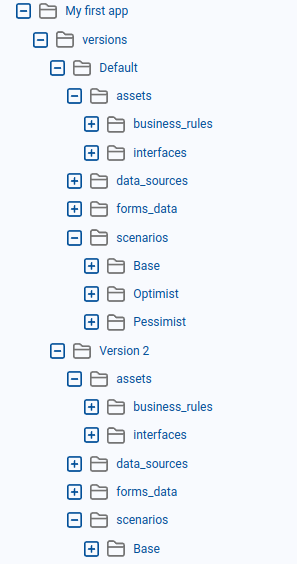
Versioning can be used in different ways, for example as part of a development cycle (dev / test / prod), or to manage planning cycles (one version per period, scenario, or plan).
Concurrent use
Two users can work (and save changes) at the same time on different versions of the same application, without interfering with each other.

Version Manager
To open the Version Manager, we go to the main menu and click Versions.
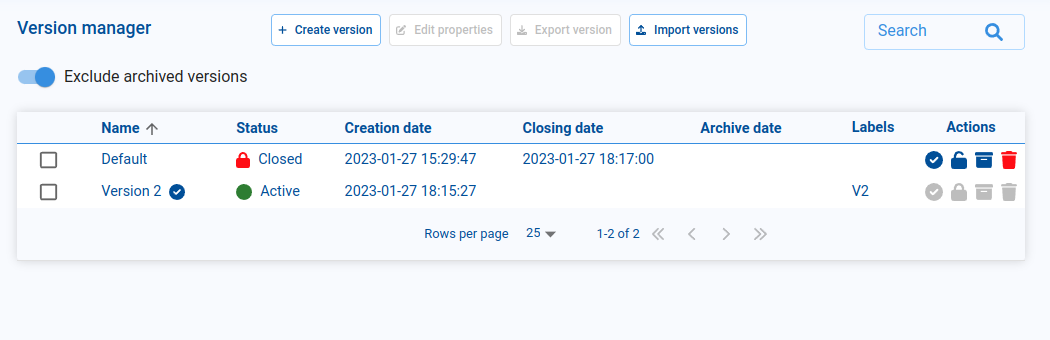
From the Version Manager we can:
- Create new versions.
- Edit version properties (name, tags, status).
- Export and import versions.
- Change the status of a version (Active, Closed, Archived).
¶ Creating a new version
To create a new version:
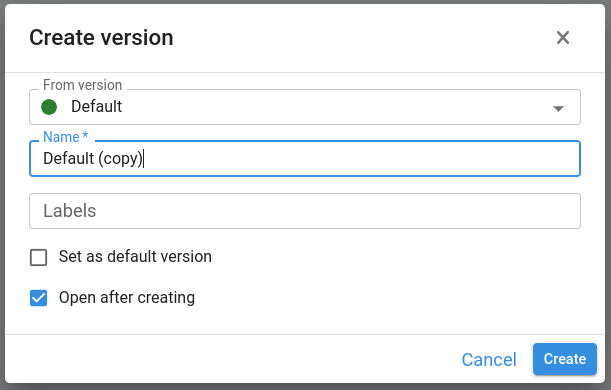
In the Version Manager, click Create version.
A dialog opens where we configure:
- Base version – every new version is created from an existing one, so all content of the selected base version is copied to the new version.
- Name – the name of the new version.
- Tags – optional labels to help us search and organize versions (type a tag and press Enter to add it).
- Set as default version – if enabled, this new version becomes the default version that opens when the application is launched.
- Open after creating – if enabled, the new version is opened immediately after creation and we will see its name in the top bar.
- Click Confirm to create the version.
¶ Version status
Each version can have one of the following statuses:
- Active
The version is in use and can be modified. We typically use Active versions for ongoing development or planning cycles. - Closed
The version is locked. It remains visible in the lists, but no further changes can be made. This is useful for freezing a version at the end of a cycle while still allowing users to open and review it. - Archived
The version is closed and archived. It cannot be modified and is hidden from the main listings, helping us keep the Version Manager clean while still preserving historical versions that may be needed for audit or reference.
By combining versions and statuses, we can manage the full lifecycle of an application—from development and testing to locked and archived snapshots—while allowing multiple users to work safely in parallel on different versions.